
Bus Error Frame Detection
SysMax CAN communication products support detailed error status and error frame logging. In complex electromagnetic environments or hardware debugging, this information helps quickly identify common faults such as physical layer wiring, bit rate matching, or terminating resistor issues.
Using PCAN-View to View Error Information
This section describes how to configure PCAN-View to capture bus anomalies. For basic operations, refer to the PCAN-View User Guide.
Enabling Error Logging
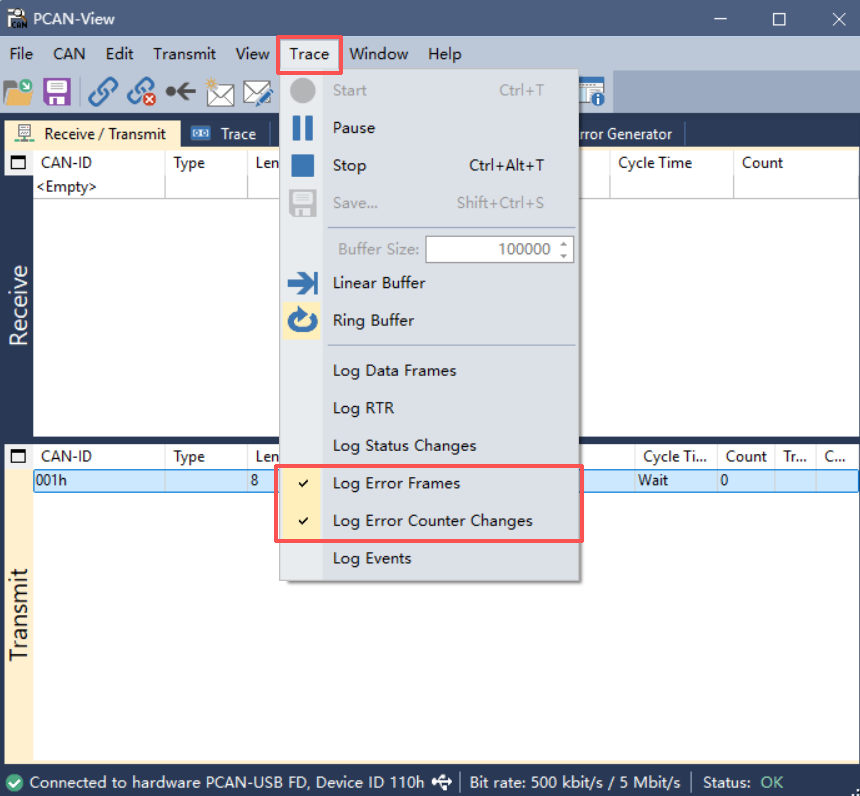
After connecting to a channel, you must manually enable the logging function, otherwise the Trace window will only display normal message data:
- Select Trace from the menu bar
- Check Log Error Frames
- Check Log Error Counter Changes
Typical Fault Case Analysis
When bus anomalies occur (e.g., slave device not connected, bit rate mismatch, missing terminating resistor), the Trace window records detailed error traces.
Case: Single Node Transmission Failure (No Termination or Remote Device)
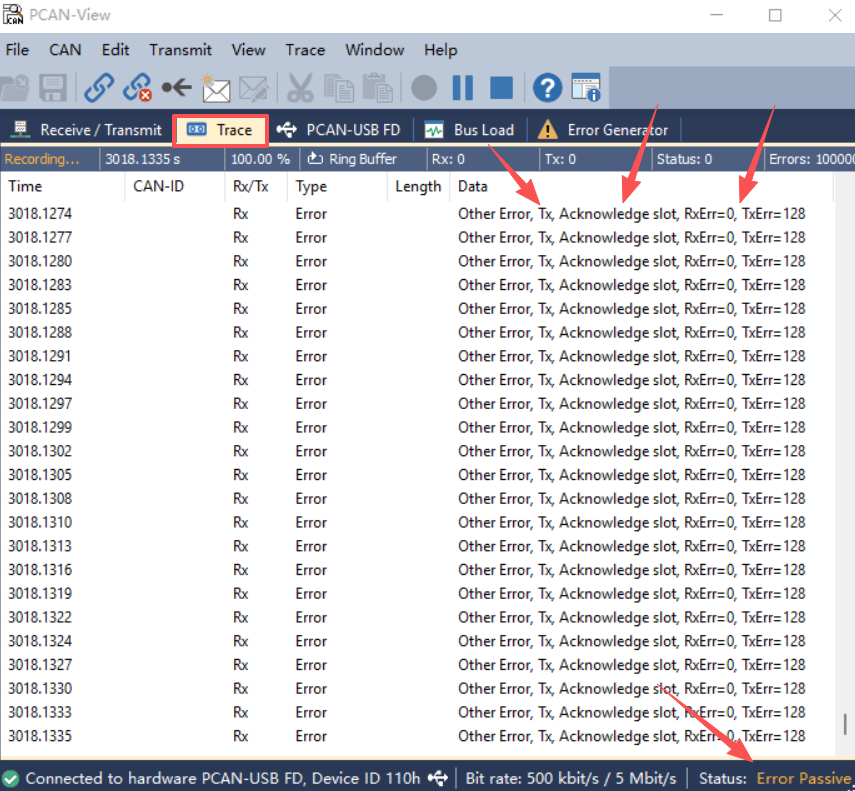
From the Trace information in the figure above, we can interpret the following key diagnostic data:
| Diagnostic Dimension | Information | Fault Inference |
|---|---|---|
| Error Type | Ack Error (Acknowledgment Error) | The transmitter sent data, but no other node on the bus responded |
| Direction/Source | Caused by Transmit (TX) | Local driver attempted output, not receiving external interference frames |
| Error Counter | TEC (Transmit Error Counter) = 128 | Errors have accumulated continuously, triggering the protocol stack protection mechanism |
| Channel Status | Error Passive | The node has entered Error Passive state, no longer actively corrupting bus data, only monitoring |
Common Error Frame Types Reference
When analyzing Trace logs, common error indications have the following meanings:
| Error Type | Description |
|---|---|
| Stuff Error | Signal has 6 consecutive bits at the same level, usually caused by bit rate mismatch or severe interference |
| Form Error | Message fixed format bits (such as CRC delimiter) are corrupted |
| Ack Error (Acknowledgment Error) | Most common, usually due to open circuit wiring, remote device not powered, or missing terminating resistor |
| Bit Error | Node detected bus level inconsistent with what it transmitted, possible driver conflict or short circuit |
Note
When the channel status enters Bus Off, it means the error counter has exceeded 255, and the node will disconnect from the bus. At this point, check the physical link and attempt to reset the hardware.