
PLIN Series
PLIN (Local Interconnect Network) series alternative products.
Overview
We provide alternative products fully compatible with PLIN protocol, supporting LIN bus communication. LIN (Local Interconnect Network) is a low-cost serial communication protocol primarily used for communication between distributed control units in automotive body electronic systems.
Basic Features
- USB Interface: Supports USB full speed mode, compatible with USB 1.1, USB 2.0, USB 3.0
- LIN Protocol: Supports LIN 1.3, LIN 2.0, LIN 2.1, LIN 2.2 specifications
- Baud Rate Adjustment: Supports standard LIN baud rates
- Compatibility: Fully compatible with PLIN API
- Electrical Isolation: Provides electrical isolation protection
- Time Stamping: High-precision time stamp recording
- Bus Monitoring: Supports bus load measurement and error frame detection
System Requirements
- Available USB interface on computer (USB 1.1, USB 2.0, or USB 3.0) or self-powered USB hub connected to computer
- Operating Systems:
- Windows 11, Windows 10, 8.1, 7 (32/64-bit)
- Linux (32/64-bit)
- MacOS
Driver Installation
Installation Steps
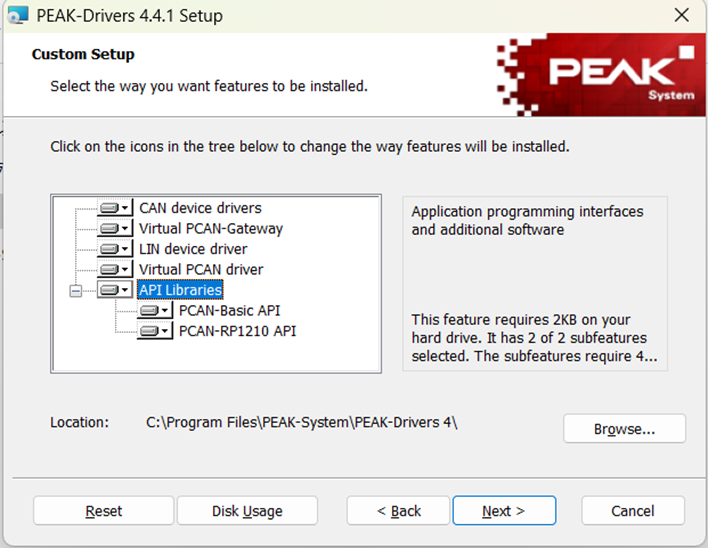
- Extract PEAK-System_Driver-Setup.zip obtained from supplier
- Double-click "PeakOemDrv.exe" to install
- Follow driver installation prompts During interface selection in installation process, select LIN device driver. If CAN devices are present, CAN portion can also be selected simultaneously.
Pin Definition
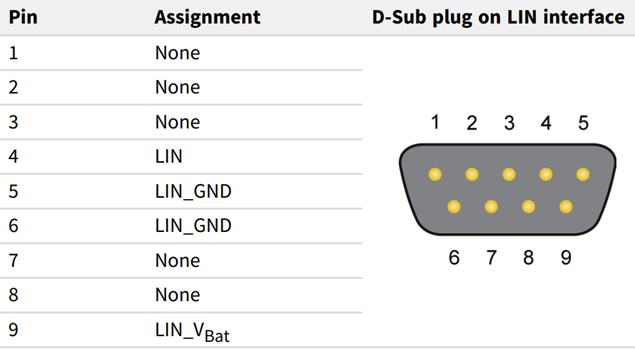
9-Pin D-Sub Interface Pin Assignment
| Pin | Function |
|---|---|
| 4 | LIN Bus |
| 5 | GND |
| 6 | GND |
| 9 | Auxiliary Power 6-28V |
Device Connection
After connecting USB-LIN to PC, LIN connection requires power in addition to LIN line.
Connection Instructions
- LIN Bus: Connect to pin 4
- Ground: Common ground for pins 5 and 6
- Auxiliary Power: Pin 9 connects to 6-28V auxiliary power
Precautions
- Generally 12V power supply is sufficient, recommended not to exceed 18V
- If USB-LIN and the LIN nodes connected use different power supplies, common ground is required for proper communication
Status Indicator
After installing driver and connecting USB-LIN device to computer, device LED indicator status is as follows:
| LED Status | Status Meaning |
|---|---|
| Green light constant on | Device connected to system driver |
| Green light slow flashing | LIN interface initialized with valid baud rate; software connected to LIN interface |
| Green light fast flashing | Data transmission on LIN bus |