PCAN (CAN 2.0) Series
1. Product Overview
The PCAN (CAN 2.0) series is a USB-to-CAN adapter designed for industrial automation and automotive electronics development. This product series is fully compatible with German PEAK-System's PCAN-USB protocol, aiming to provide users with high reliability and cost-effective alternatives. Based on different requirements for compatibility depth, firmware upgrade needs, and cost budget, three options are available from basic compatibility to full-featured enhanced models.
- Full Compatibility: No need to modify existing software architecture, supports native PCAN driver
- Industrial Protection: Built-in 1500 Vrms electrical isolation, effectively protects PC from surge and ESD interference
- Plug and Play: Compact design, suitable for laboratory development and mobile field debugging
2. Hardware Specifications
2.1 Model Comparison
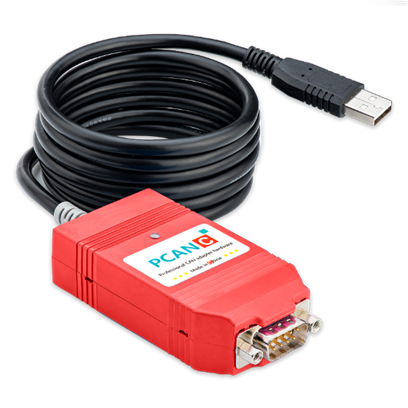
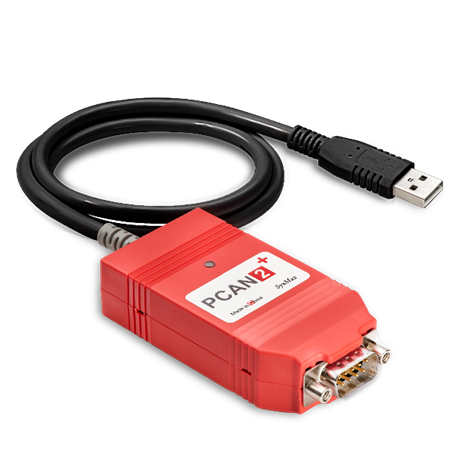
This series provides three models with differences as follows:
| Feature Item | Basic: PCAN2 Plus | Cost-effective: PCAN C | Recommended: PCAN C Plus |
|---|---|---|---|
| Firmware Solution | Compatibility Solution | Original Solution | Original Solution |
| Compatibility | 95% | 99.9% | 100% |
| Firmware Upgrade | Not Supported | Supported | Supported |
| Driver Version | 4.2.1 and above | All versions | All versions |
| USB Cable Length | 0.8m | 0.8m | 1.5m |
| Core Positioning | Cost-sensitive, basic monitoring | Import alternative, domestic demand | High-quality best choice |
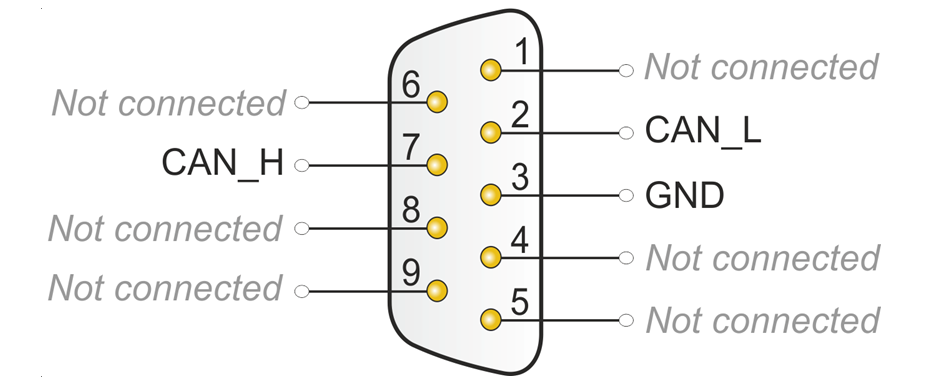
2.2 Pin Definitions (DB9)
Note: Must confirm bus connection conforms to the following definition. Incorrect wiring may cause device malfunction or damage.
| Pin | Signal | Description |
|---|---|---|
| 2 | CAN_L | CAN Low signal line |
| 7 | CAN_H | CAN High signal line |
| 3 | GND | Ground |
| Others | NC | Not connected |
3. Software and Driver Ecosystem
Since the hardware protocol layer is fully compatible, this product can directly access the complete PCAN ecosystem.
- Official Software: Supports Windows monitor PCAN-View, providing real-time message transceiving, error frame monitoring
- Development Interface: Supports PCAN-Basic API. Users can perform secondary development using C++, Python, C#, LabVIEW, etc.
- Third-party Compatibility: Seamlessly supports common third-party software (e.g., Busmaster, TSMaster, EcuBus, etc.)
- Multi-platform Support:
- Windows: 11 / 10 / 8.1 / 7 (32/64-bit)
- Linux: Based on Chardev or SocketCAN driver
- MacOS: Supports MacCAN driver library
4. Operation Instructions and Indicator LEDs
4.1 Driver Installation
鈿狅笍 Important: Must follow the principle of "install driver first, then plug in hardware".
- Obtain driver compressed package
PEAK-System_Driver-Setup.zipfrom the provided cloud drive materials - Extract and run
PeakOemDrv.exe, accept defaults to complete installation - Plug device into USB interface, confirm
CAN-Hardware -> PCAN-USB FDappears in "Device Manager" - Check adapter LED status, after driver successfully recognizes the device, refer to
4.2-Indicator LED Logicsection for indicator status
4.2 Indicator LED Logic
PCAN series adapters use dual-color indicators to define device status. Please first confirm your product batch, refer to your specific model:
PCAN-C-USB
| Status | Meaning |
|---|---|
| Orange/Green alternating slow flash 馃煚馃煝 | Device connected, waiting for startup |
| Orange constant on 馃煚 | Driver recognized, in ready state |
| Green constant on 馃煝 | Power on only, driver not installed/recognition failed |
| Orange/Green fast flash 馃煚馃煝 | Data transmitting/receiving |
PCAN2-Plus
| Status | Meaning |
|---|---|
| Red/Green alternating slow flash 馃敶馃煝 | Driver not installed |
| Red constant on 馃敶 | Connection abnormal |
| Green constant on 馃煝 | Device ready |
| Red/Green fast flash 馃敶馃煝 | Respectively representing receiving/transmitting data |
4.3 Terminating Resistor Configuration
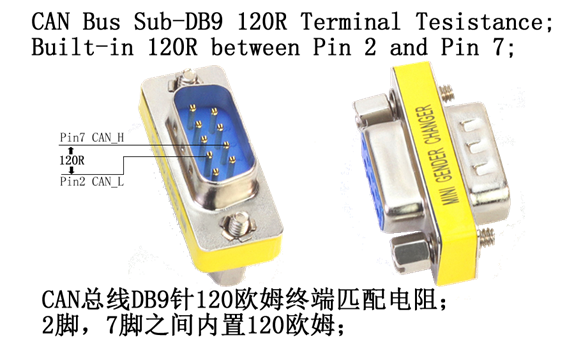
High-speed CAN bus (ISO 11898-2) must configure 120 ohm terminating resistors at both ends of the bus. Terminating resistors prevent reflection of interference signals, ensuring normal operation of transceivers connected to CAN nodes (CAN interfaces, control devices).
PCAN-C-USB defaults to no built-in terminating resistor. If you need to connect terminating resistor at the adapter end, you can contact your supplier to purchase terminating resistor accessories compatible with 9-pin D-Sub interface.
5. Supply List
- PCAN2 Plus / PCAN C standard package:
- CAN adapter main unit
- DB9 adapter board
- PCAN C Plus full package:
- CAN adapter main unit (1.5m cable)
- DB9 adapter board
- 120惟 terminating resistor
- Flathead screwdriver
- Dupont test wires